After a Zwift or indoor ride, post the numbers that are true indoors: power and time. Lead with average power for a steady session or a structured workout, or normalised power for a race or a hilly virtual route, add moving time and heart rate if you want, and leave off the speed and the map, which belong to a virtual world. For the photo, use the setup itself: the bike on the trainer, the fan, the towel, the screen, or a Zwift screenshot.
From November to February a lot of riding in the Northern Hemisphere moves indoors, and indoor rides are the hardest rides to post. There is no view, the route is a game map, and the speed looks heroic for reasons everyone knows.
Which numbers are honest indoors?
| Number | Indoors | Why |
|---|---|---|
| Average power | Show it | The trainer or power meter measures it, so it is real |
| Normalised power | Show it on a race or hilly route | Surges matter, as outdoors |
| Moving time | Show it | An hour on the trainer is an hour |
| Heart rate | Show it if you like | The cost of the effort, same as outdoors |
| kJ | Show it on a long session | The size of the work |
| Speed | Leave it off | The app works it out from your power on a virtual road |
| Distance | Small, if at all | It follows from the virtual speed |
| Elevation gain | Only on a real climbing route | It is the virtual course's climbing |
| The map | Leave it off | It is a game world, not where you were |
For a sense of how far indoor speed drifts from the road: in 423 indoor rides synced to SHUTT by 17 cyclists in 2026, the median was 32.3 km at 32.8 km/h, against 20.3 km/h for outdoor rides. The sample is small, but the gap is the point. The outdoor figures are in how to put speed, elevation and the route on a cycling photo.
Which power number to lead with, in short:
- Structured workout or steady endurance: average power.
- Zwift race, group ride or a route with climbs: normalised power, because the surges cost more than the average says.
- An FTP test or a set of intervals: the best 20 minutes, or the interval power, is the number other riders recognise.
The full explanation of NP, IF, VI and kJ is in how to show watts, NP and kJ on a ride photo.
What photo should you use for an indoor ride?
There is no summit, so make the room the picture:
- The setup from the side: bike, trainer, fan, the screen glowing. Low light and one lamp look better than the ceiling light.
- The aftermath: the towel over the bars, sweat on the top tube, the bottle. It says "that hurt" without a number.
- The screen: a Zwift screenshot of the moment you were in the group or on the climb.
- You, mid-effort: a timer on the phone, propped on a shelf.
Zwift can also send pictures to Strava. According to Strava's help page on Zwift photos and videos, with the two accounts connected and Zwift's Image Uploading set to Always, up to five photos and one video of five to fifteen seconds taken while Zwifting upload with the activity. You choose which ones before you save, and they can take eight to ten minutes to show up.
How does Strava treat a Virtual Ride?
From Strava's help page on virtual trainer activities (September 2026):
- An activity gets a virtual sport type only when a supported virtual trainer app records it that way. You cannot mark it virtual yourself.
- Once it is a Virtual Ride, its type cannot be changed.
- Virtual Rides count toward your profile totals and your power best efforts, but not toward your biggest climb or distance best efforts.
- If you want a trainer ride off public segment leaderboards, one of the options is the Indoor tag, which also hides the map.
So whether a session shows up as a Virtual Ride or an ordinary Ride depends on the app that recorded it.
How do you share an indoor ride from Strava?
Strava's own share sticker for a ride shows distance, elevation gain and ride time, a line of the route and the Strava logo, laid over a photo in an Instagram Story. On an indoor ride those numbers come from the virtual course and there is no power on it, so it suits a quick Story better than a session you are proud of. The steps are in how to share a Strava ride on Instagram without a screenshot.
By hand, take the photo, open it in Instagram Stories or Canva, and type two things large: the power with its unit ("231 W avg" or "NP 248 W") and the time. That is a complete indoor post.
How do you put an indoor ride on a photo with SHUTT?
SHUTT, the iPhone app I make (compatible with Strava, not made by Strava), reads the ride from Strava, and its five ride looks change what they show when Strava files it as a Virtual Ride:
- It labels it INDOOR RIDE and leaves out the place, the coordinates and the weather, which would be the virtual world's.
- In the ride looks, elevation gain only appears when the route was a real climb, 10 m per kilometre or more. A few hundred metres spread over a long flat virtual route is left off.
- The ride's headline numbers become moving time, average power, heart rate and normalised power when the power was measured. Without measured power they are moving time, average speed and heart rate.
- Cronaca puts normalised power where the elevation would be. Cadre draws a power or heart-rate trace in its centre instead of the route, when SHUTT has the ride's full data (it keeps that for Pro rides). Étape in its Roadbook style draws bars instead of a profile: power with the full data, otherwise speed per kilometre; its Hairline style draws a single watts line when it has the full data. Head Unit in its Laps style sets normalised power large, with IF, TSS and your FTP under it once you have set your FTP in Settings.
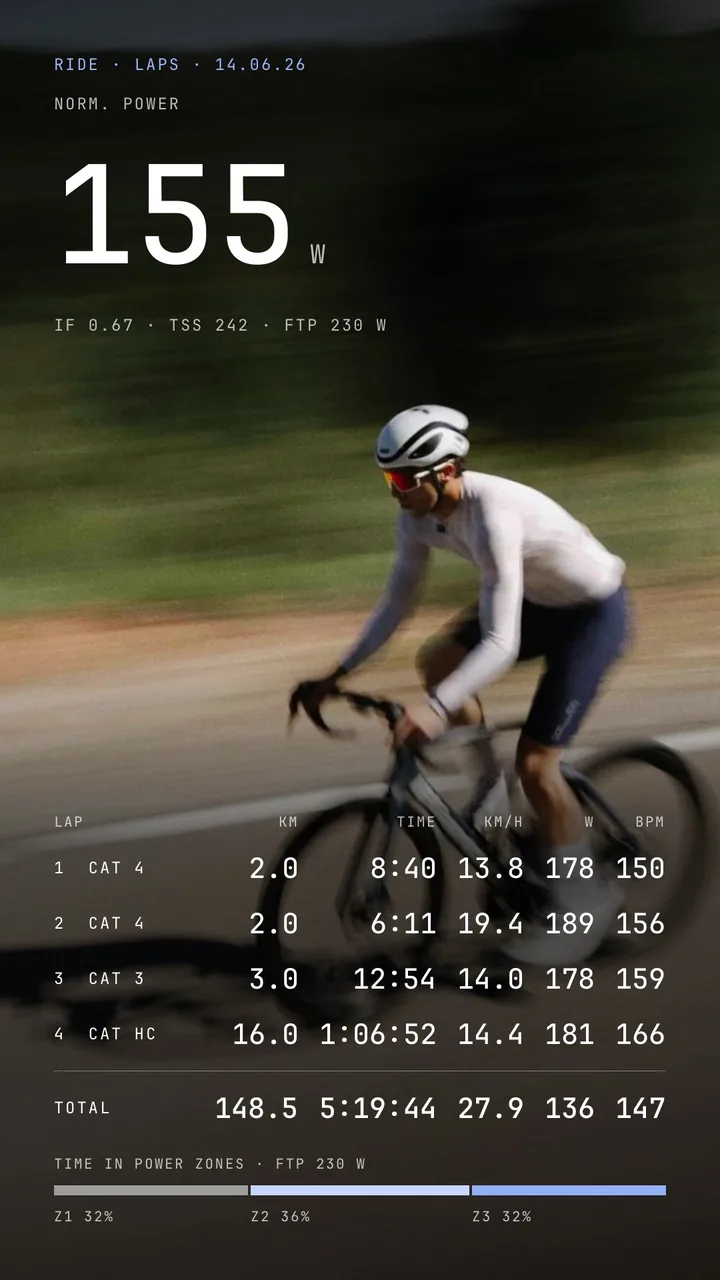
Power only appears when Strava has it from a power meter or a smart trainer; Strava's own estimates are left off. Best 5-second to 60-minute power, worked out from the ride's full watts data, needs Pro.
Outside the ride looks, you can tick the power numbers in the stats panel and untick the route and speed, so any look carries just the indoor numbers.
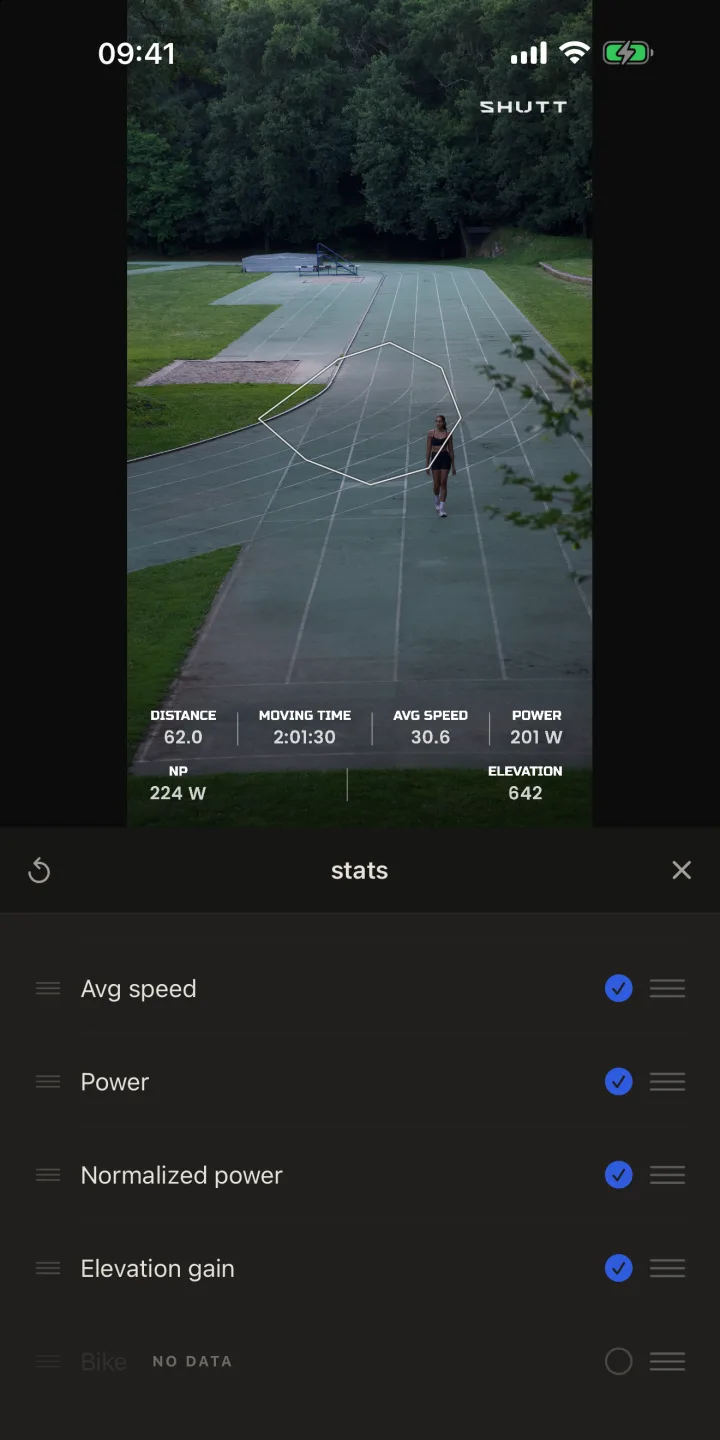
If your trainer app uploads the session as an ordinary Ride rather than a Virtual Ride, SHUTT treats it as an ordinary ride, so pick the numbers yourself in the stats panel. Pick Story (9:16), Post (4:5) or Square (1:1) when you save. SHUTT is free, with a small SHUTT mark on free exports, and it never changes anything in your Strava account.
Habits for indoor posts
- Units on every number. "248" could be watts, kilojoules or minutes.
- Say what kind of session it was. "Sweet spot, 3 x 15" or "Zwift race, B" tells riders how to read the watts.
- One power number. Two at most, if they say different things.
- No map, no speed. Everyone who rides indoors knows why.
For the whole picture of ride stats on a photo, see the best apps to put Strava ride stats on a photo, and SHUTT's ride page for the looks on outdoor rides.