To show power on an Instagram story, pick the one watts number that explains the ride (normalised power for a hard outdoor ride, average power for a steady indoor session, kJ for a long day), then either type it over your photo in Stories or use an app that reads the measured power from Strava and draws it on the photo for you. Only show power that came from a power meter or a smart trainer: without one, Strava estimates watts from your weight, speed and elevation change, and other cyclists can tell an estimate at a glance.
Almost nobody puts power on a still photo. Strava's sticker shows distance, elevation gain and ride time, Garmin riders have asked on Garmin's own forum to add power to the share image, and the apps that do draw watts mostly work on video. So a ride photo with an honest NP on it still stands out.
What do the power numbers mean?
| Number | What it is | Reads well when |
|---|---|---|
| Average power (W) | The mean wattage over the ride | The effort was steady: a trainer session, a time trial |
| Normalised power, NP (W) | The steady wattage that would have cost the same as your real, uneven ride | The ride had climbs, attacks or a lot of corners |
| Intensity factor, IF | NP divided by your FTP | You want to say how hard it was for you, not in absolute watts |
| Variability index, VI | NP divided by average power | You want to show a ride was smooth (about 1.0) or stochastic (1.2 and up) |
| Work (kJ) | Average power times time: the total energy into the pedals | The ride was long; it is the size of the day |
| Best 5 s, 1 min, 5 min, 20 min, 60 min (W) | The highest average you held for that long | A sprint, a climb, an effort you are proud of |
A few details worth knowing:
- Average power counts the coasting. Every descent and every red light where you stopped pedalling pulls the average down, which is why a hilly ride can show a modest average for a hard day.
- NP fixes that, roughly. It weights the hard parts more, because surges cost more than their share of the average. Strava labels it "Weighted Avg Power".
- IF needs an FTP. FTP is the power you could hold for about an hour. An IF of 0.75 is a solid endurance ride; around 1.0 is an hour flat out.
- kJ and calories. A kilojoule of work at the pedals is close to a kilocalorie burned, as a rule of thumb, because the body wastes most of the energy as heat. Strava's calories and your kJ will be in the same range.
- Best 20 minutes is the number people associate with FTP tests, so it means something to other riders on its own.
Which power number should you show?
| Ride | Lead with | Add | Skip |
|---|---|---|---|
| Indoor session or turbo workout | Average power | Time, heart rate | Speed and the map (both virtual) |
| Hilly outdoor ride | NP | Elevation gain, distance | Average power |
| Race or hard group ride | NP or IF | Best 1 min or 5 min | VI |
| A climb you went for | Best 20 min (or the time of the climb) | Elevation gain | kJ |
| Long day or sportive | kJ | Distance, moving time | IF |
| Easy coffee ride | Nothing | Distance, the cafe | All of it |
One power number is usually enough. Two works if they say different things, like NP and kJ on a long hard day. Four watts figures on one photo reads as a spreadsheet.
Measured or estimated: why it matters
Strava shows a power figure for most rides, even without a power meter, by estimating it from your weight, your bike's weight, your speed and the elevation change. Its own help pages call that estimate a rough approximation and say power zones need a real meter (checked 23 November 2026). Once an estimate is typed onto a photo it looks like the real thing, and a rider with a power meter will notice.
Strava only sends weighted average power and max power for rides with real power data, and the second-by-second watts stream only exists when there was a meter. SHUTT uses exactly that as the test: if any of those is there, the power is measured and it can go on the photo; if not, the power fields stay empty. No meter, no watts. On those rides, speed, elevation and heart rate do the job.
How do you put power on a photo by hand?
- Open the ride on Strava and note the power number you want. NP is listed as weighted average power.
- Open the photo in Instagram Stories or Canva.
- Type the number large with the unit always on: "248 W", never "248".
- Add one line of context in small type: "NP" or "IF 0.86" or "3,120 kJ".
It works, but every number is typed by hand, and one wrong digit in a watts figure is the kind of thing other riders notice.
How do you put power on a photo with SHUTT?
In SHUTT, which I make (an independent iPhone app that works with Strava), rides come in from Strava with their power, and the ride looks use it when it was measured:
- Head Unit, Laps style: normalised power set large, with IF, TSS and your FTP on the line under it, then the ride cut into one lap per climb.
- Head Unit, Fields style: the distance large, then a grid of fields like a bike computer, which includes normalised power, IF and work in kJ when the ride has them.
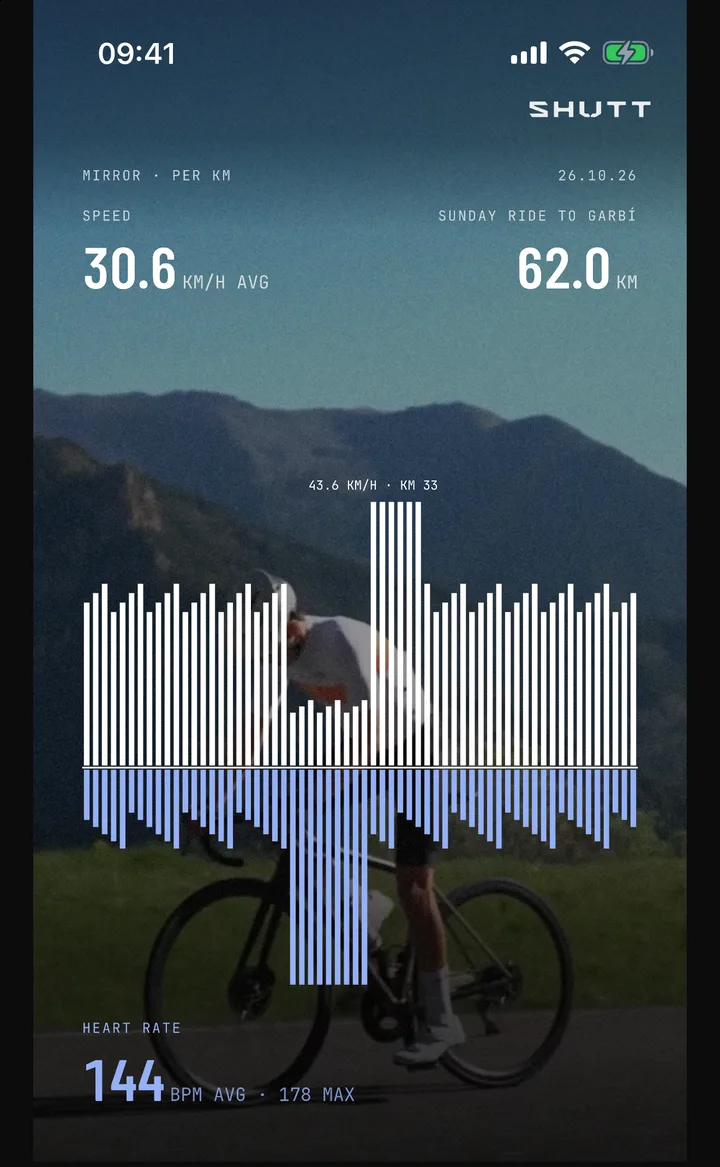
- Mirror: power drawn above the line and heart rate below, on one axis, so the cost of each surge is right under it. The power line needs the ride's full data, which SHUTT keeps for Pro rides; otherwise Mirror draws speed per kilometre.
- Cronaca on an indoor ride puts normalised power where the elevation would be, and Cadre shows average power and heart rate and, when SHUTT has the ride's full data, draws a power or heart-rate trace where the route would be, since an indoor route is a virtual world.
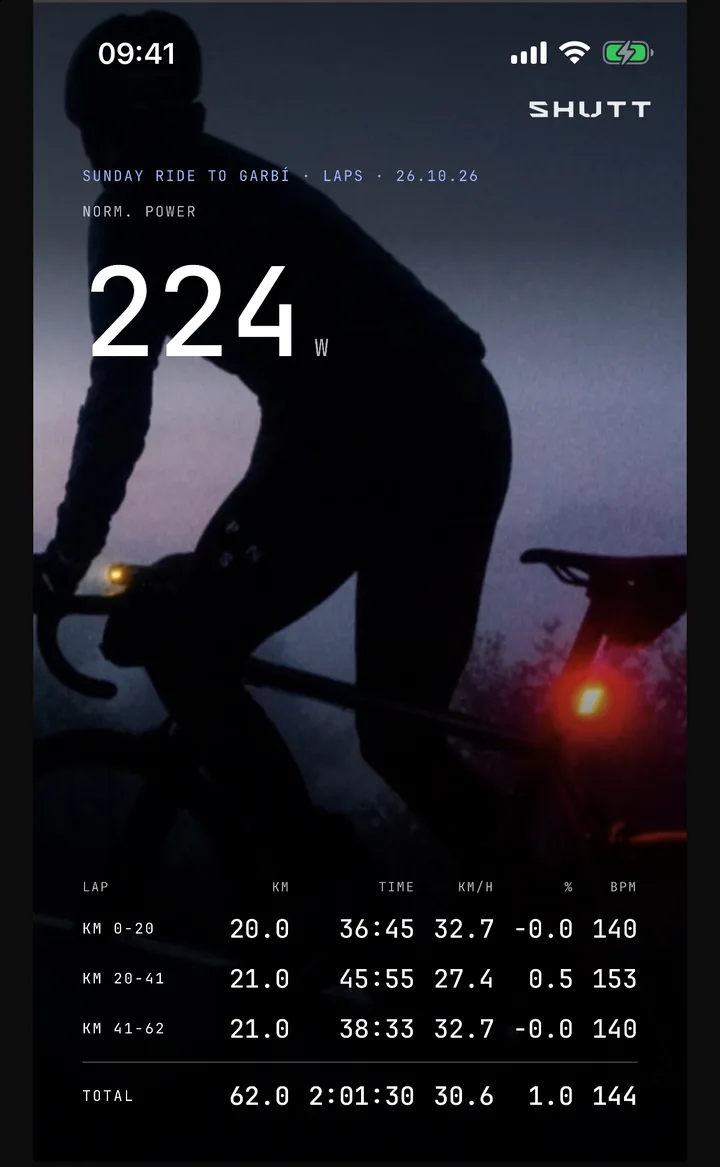
Outside the ride looks, power numbers are stat blocks you can add to any design: power, normalised power, intensity factor, variability index, and (with Pro) best 5-second, 1-minute, 5-minute, 20-minute and 60-minute power. The best-power windows come from the ride's full watts stream, which SHUTT fetches for Pro rides, and a window only shows when the ride was long enough to fill it.
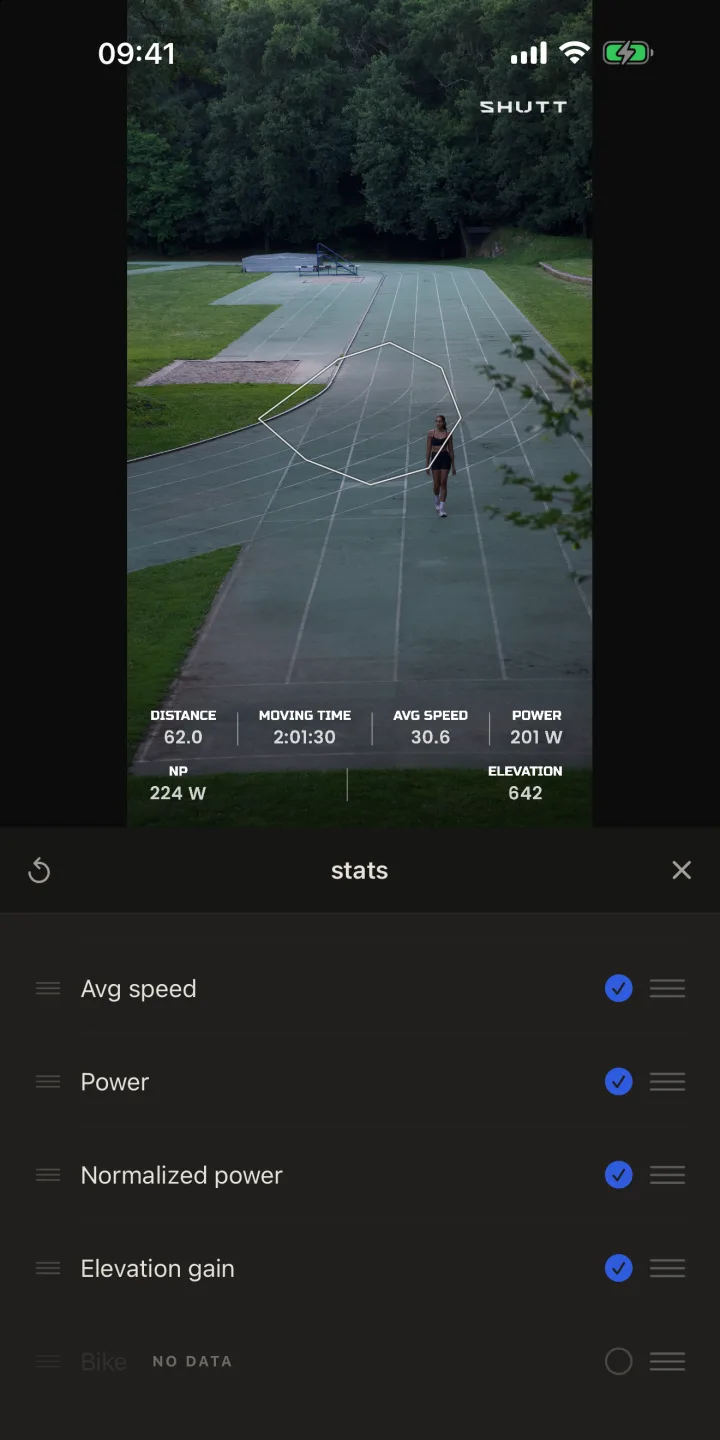
IF and TSS need your FTP. SHUTT asks for it in Settings, next to the Cycling switch; set it once and every ride uses it.
Habits that keep power readable
- Units on, always. "248" could be watts, metres or kilojoules.
- One headline number. Make it big; everything else small.
- Say which power. "NP 248 W" and "248 W avg" are different claims.
- W/kg is your call. It is the number climbers compare, but it means printing your weight. SHUTT does not calculate it for you.
- Indoor rides: drop the map. The route is a virtual world and the speed is the trainer's model. Power is the honest number.
For the rest of a ride photo (speed, elevation, the route), see how to put speed, elevation and the route on a cycling photo, and for getting it onto Instagram, how to share a Strava ride on Instagram without a screenshot.