Sharing a Strava activity is still free in November 2026: any athlete can share a GPS run or ride to Instagram, WhatsApp, other apps, text or email, and Strava's help page says its share stickers are free for all athletes. What changed in October 2026 is that some specific share layouts became subscriber-only, along with the PR graphic runners reported, Flyover videos and the personal Year in Sport recap.
Disclosure: I make one of the apps mentioned near the end. Every fact about Strava below comes from Strava's own help pages, its blog or its official account, read on 24 November 2026, unless I say otherwise.
What changed in Strava sharing in 2026?
Three things happened in a few weeks:
- Late September 2026: runners in r/Strava started seeing new share stickers and layouts, including transparent ones you place over your own photo, a splits card and a PR graphic.
- About 9 October 2026: a thread titled "Activity sharing subscribers only?" noticed that some of those layouts were now locked. Strava's official account replied in the thread that sharing to social platforms does not need a subscription, but that some specific shareable assets are for subscribers, and that non-subscribers will not see or be able to use those options.
- 27 October 2026: Strava's What's New post announced the new activity stickers as "free for everyone" (Strava stories).
So both statements are true at once: the stickers as a feature are free, and a few individual layouts inside the share menu are not.
What is free and what needs a subscription?
| Share option | Free | Subscribers | Source (read 24 Nov 2026) |
|---|---|---|---|
| Share a GPS activity to Instagram, WhatsApp, other apps, text or email | Yes | Yes | Sharing your activities |
| Share to X from the Strava website | Yes | Yes | Same page |
| Activity stickers (transparent, for Instagram Stories) | Yes, most of them | Yes | Transparent sticker help |
| Some individual sticker layouts | No | Yes | Same page, and Strava on r/Strava, 9 Oct 2026 |
| The PR share graphic | Reported as no | Yes | Runners in r/Strava, October 2026 |
| Flyover video, including sharing it | No | Yes | Flyover |
| Personal Year in Sport recap | No (since 2025) | Yes | Strava press release, 26 Aug 2025 |
| Map or photo card for indoor, stationary or manual activities | No | No | Sharing your activities |
Some details from those pages that matter when you share:
- Stickers need the app. They work in the Strava app on iPhone and Android, version 482 or later, and not on the website.
- The stats are fixed. For a run the share shows moving time, distance and pace; for a ride, moving time, distance and elevation. You cannot pick other stats.
- Hidden stats stay hidden. Stickers follow what you have hidden on the activity.
- Strava's subscription page does not list sharing. Its feature list (dated 10 September 2026) covers things like Best Efforts, training analysis, routes and heatmaps, and says nothing about share layouts. That is why the locked layouts surprised people.
How do you tell which Strava layouts are locked?
Strava does not publish a list, and the set has changed since September, so the only reliable check is your own share menu:
- Open a GPS run in the Strava app and tap share.
- Swipe through the layouts. A locked one either does not appear at all for free athletes, or shows a message that it is for subscribers only (Strava describes both).
- If a layout shows a gray or checkered background, it is not locked: that is a transparent sticker, meant to go on top of your own photo in Instagram.
- If none of the new layouts appear, update the app. Some runners also report the splits card arriving unevenly; see why the Strava splits card may be missing.
If the share button does nothing useful, the activity may be indoor or manual, which cannot be shared with a map, or set to a privacy level that blocks it. Why a Strava activity won't share to Instagram walks through each cause.
What are the free ways to share a run without a subscription?
You can get most of what the locked layouts do with the free tools.
1. The free transparent sticker on your own photo
This is the closest free match to the new layouts.
- In Strava, open the run, tap share and pick a sticker with a checkered background.
- Choose Instagram Stories, or save the sticker to your camera roll for another app.
- In Instagram, set your own photo as the background and place the sticker over a dark part of it.
- Type anything Strava leaves out, such as the race name or your PR, with Instagram's text tool.
The stickers are white with no background, so they can vanish on sky or snow. Five free fixes for a hard-to-read sticker covers that.
2. Type the missing number yourself
The PR graphic was the layout people missed most. Without it, share the free sticker and type the PR time large above it. Sharing a Strava PR without a subscription has the steps and what to show.
3. A screenshot crop
For the things no free share covers, like a splits table or an indoor run, screenshot the activity page in Strava, crop it in Photos and add it to your Story as a photo sticker. It looks like the Strava app rather than a design, but it costs nothing and works on any phone.
4. Make your own year recap
The personal Year in Sport recap has been for subscribers since 2025. Strava's activity data is still yours to share, so a single photo with your yearly distance typed on it, or an app that adds up your year, does the job. Year in Sport alternatives lists the options.
5. An overlay app that reads your Strava activity
Overlay apps connect to your Strava account and lay the run out on your own photo, with no Strava subscription needed. They also get around the fixed three stats in Strava's share.
One of them is SHUTT, which I make (iPhone only; it works with Strava but is not made by Strava). Distance, pace, splits, elevation and the route are free there. Free exports carry a small mark, and the Pro tier opens premium looks, heart-rate stats (free to preview, Pro to save), five premium route styles and transparent export.
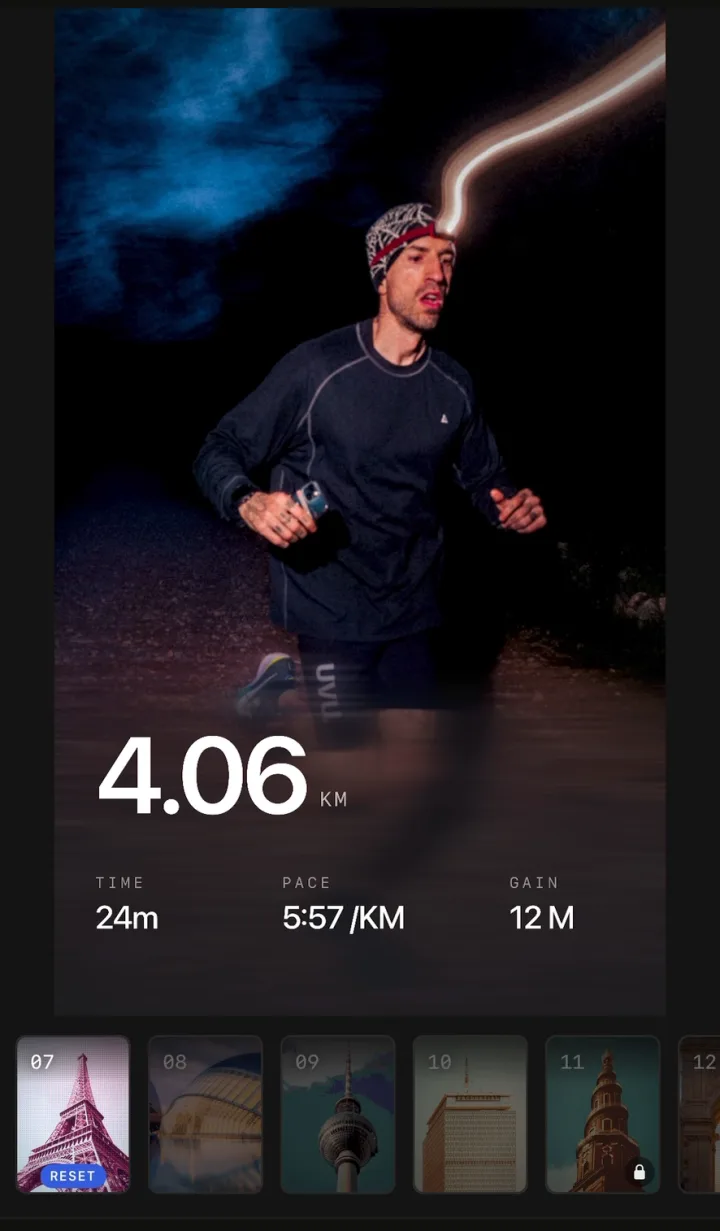
StatShot, Picstat and Relay do similar jobs with different strengths, and some run on Android too; the overlay app comparison sets them side by side.
Is a Strava subscription worth it just for sharing?
Probably not, if sharing is all you want. Sharing itself is free, most stickers are free, and the locked layouts are a handful of designs you can rebuild with a sticker, a typed number or an overlay app.
It is worth it if you also use what the subscription is really built around: segment leaderboards, Best Efforts history, training analysis, route building and Flyover. On 24 November 2026, Strava's subscribe page showed €49.99 a year for an individual plan in the EU, with a 30-day free trial, and €24.99 a year for students (Strava). The trial is a cheap way to see the locked layouts on your own runs before deciding.
One last caution: Strava has changed the share menu twice since September, and the help pages are dated September and October 2026. If something here no longer matches your app, the app is right.