Disclosure first: I make SHUTT. I built it in Valencia and it is one of the apps below. Read this with that in mind. I have tried to say plainly where the others beat it, and every fact about another app comes from its store listing or support pages, checked in October 2026.
The short answer, by need:
- Your own photo with design-led typography: SHUTT (iPhone).
- Free and quick: Strava's own share and sticker.
- Lots of stat stickers on iOS: Relay.
- Android: PicStat, Run Story or Run Photo.
- Your own video or GoPro footage: STREIV.
- A 3D flyover: Relive or Strava Flyover. Note that Relive no longer connects to Strava.
How do the apps compare?
Prices are US list prices at the time of writing (October 2026). They change often, so check the store page before you pay.
| App | Platforms | Strava sync | Photo | Video | Route | Pricing (Oct 2026) |
|---|---|---|---|---|---|---|
| SHUTT | iPhone | Yes | Yes | Yes | 49 line styles, or a map | Free; Pro monthly, yearly or one-time |
| Strava share | iOS, Android | Built in | Yes | Flyover only | Line | Free |
| Strava Flyover | iOS, Android | Built in | No | Yes | 3D | Subscriber-only |
| Relive | iOS, Android, web | No | Photos inside the video | Yes | 3D | Free 1 video per activity; Plus $6.99/mo or $38.99/yr |
| Relay | iOS | Yes | Yes | Yes | Yes | Pro $1.99/wk, $4.99/mo, $39.99/yr |
| PicStat | iOS, Android | Yes, plus GPX | Yes | Yes | Yes, animated | Free + in-app $0.99 to $44.99 |
| Run Story | iOS, Android | Yes, plus Garmin, Apple Health | Yes | Yes | Yes | Free; watermark or ads removal $0.99 each |
| Run Photo | iOS, Android | Yes, plus Garmin | Yes | Yes | Yes | $9.99/mo, $59.99/yr, $99.99 lifetime |
| STREIV | iOS, Android | Yes | No | Yes | Yes | Free + PRO $9.99 |
| Slid | iOS | Yes, plus Apple Health | Inside the video | Yes | Animated, 3D | Free + Pro in-app $0.99 to $41.99 |
What is SHUTT good at, and where does it fall short?
SHUTT connects to Strava once, then your activities appear on their own. You open a run, pick a photo or a clip from your camera roll, and pick a look. The stats come from Strava, so there is nothing to type.
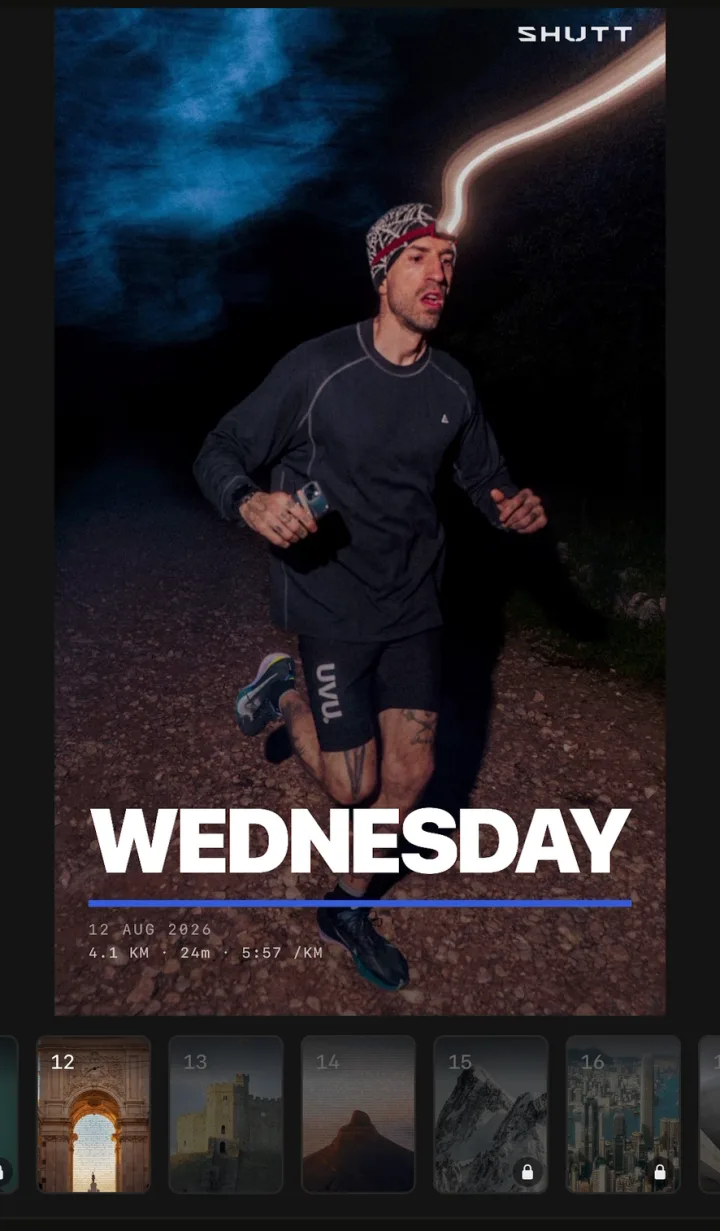
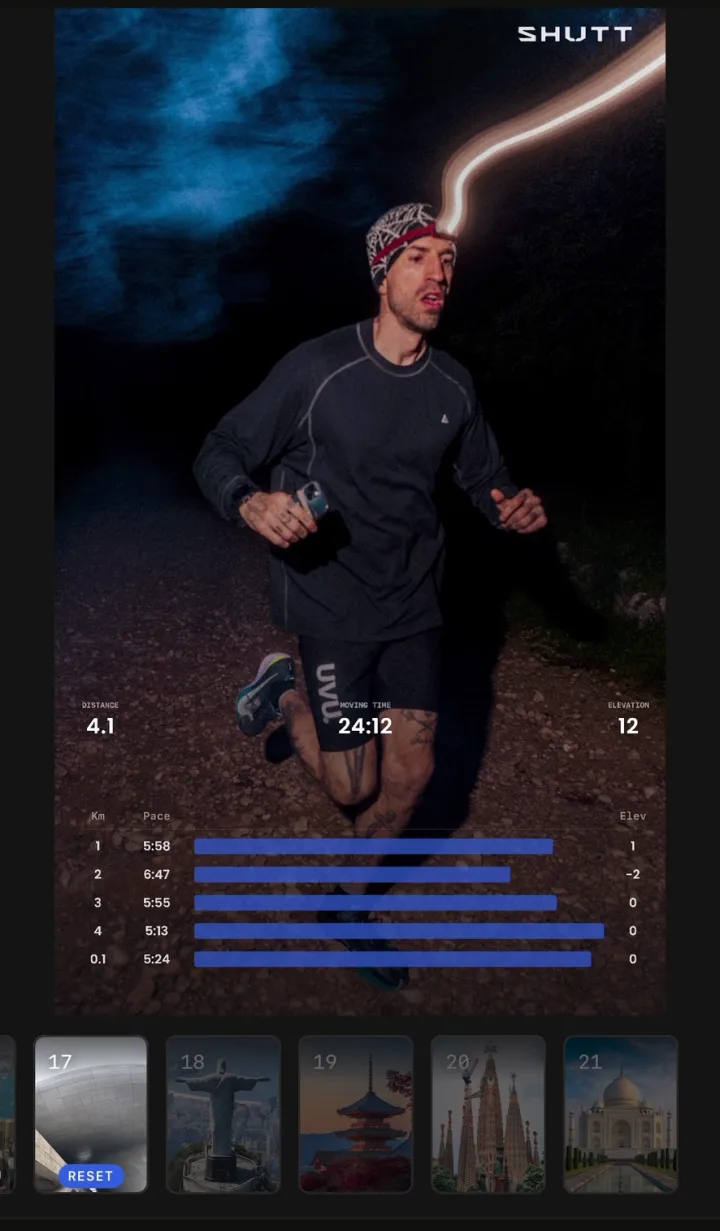
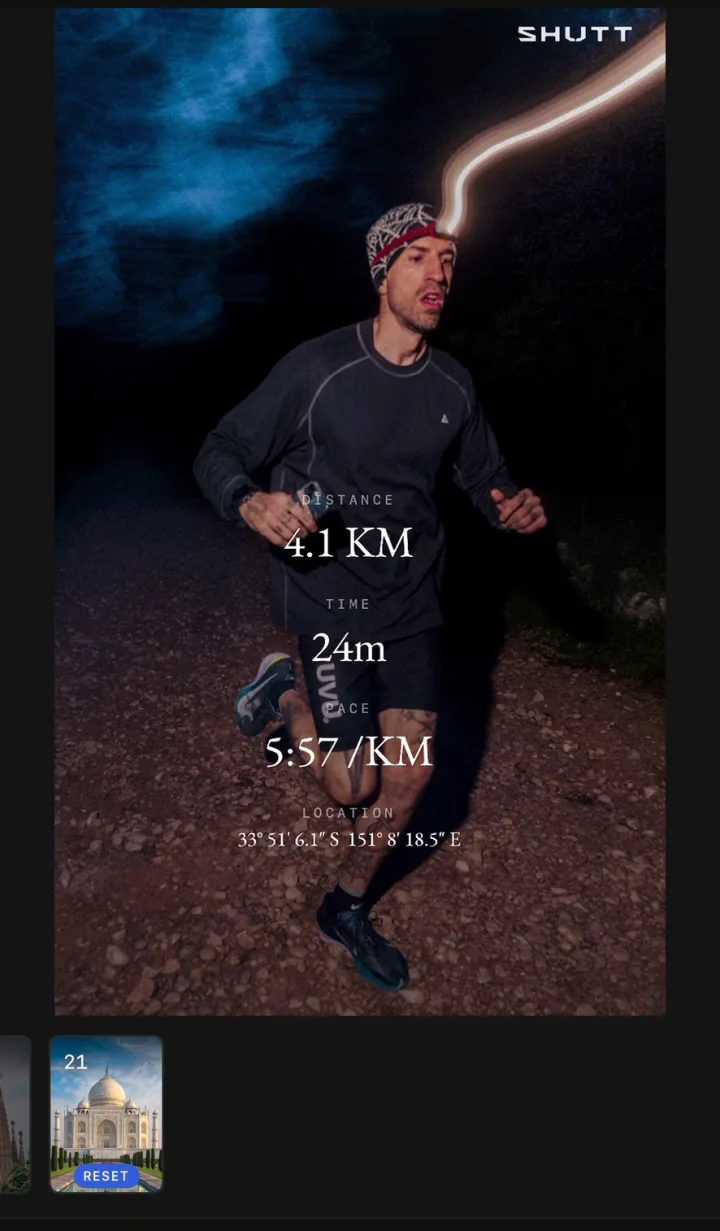
Where it is strong:
- Finished looks, not blank templates. There are 33 looks, each a complete design with a name. "Silver", for example, engraves the run on a steel plate that reflects your photo. New looks arrive with most updates.
- The route as a mark. Your route is drawn over the photo as a line in 49 styles, or as a map under it.
- Type. 28 typefaces, with colour, weight, spacing and shadow per element. Every block drags, resizes and snaps.
- Photo and video with the same looks. A clip keeps the brightness and colour you filmed.
- 30+ stats, from pace and splits to heart-rate zones, weather, shoes and the song you were listening to.
- Free to use. Free exports carry a small SHUTT mark. Pro removes it and opens premium looks, heart-rate stats, Apple Maps routes and transparent export.
Where others beat it:
- No Android. SHUTT is iPhone only (iOS 17+). PicStat, Run Story, Run Photo and STREIV all run on Android.
- Fewer pieces. 33 looks against Relay's 80+ stickers or Share Aura's 45+ templates. If you want a big library to pick from, SHUTT is not that.
- No 3D flyover. Relive, Strava Flyover and Slid do this; SHUTT does not.
- Cheaper one-time options exist. Run Story removes its watermark for $0.99.
The full list of what SHUTT does is on the features page.
Is Strava's own share enough?
For a lot of runs, yes. Strava's share is free and built in. On a GPS activity you can share a map or one of your activity photos with stats added, or drop a transparent stats sticker into an Instagram Story.
The limits: you can't choose which stats appear (runs get moving time, distance and pace), there is little control over type or layout, and indoor or manual activities get no map share. Strava will also only share activities set to Followers or Everyone. If you want to get more out of it, see how to share Strava runs on Instagram.
What about Strava Flyover?
Strava Flyover turns your route into a 3D flyover video you can share to Instagram. It is subscriber-only and it does not use your own photos.
Relive
Relive makes a 3D flyover video of the activity with your photos placed along it. It is polished and well rated (4.8 from about 70,000 ratings on the App Store). The catch for Strava users: Relive no longer connects to Strava. Strava ended the partnership in 2019, so you have to sync from Garmin, Apple Health, Suunto, COROS, Wahoo, Polar or similar. Free gives you one video per activity; Plus allows up to 100 photos.
Relay
Relay offers 80+ stat stickers: heart-rate graph, splits, route, elevation and more, on photos and video. If you think in stickers you stack and arrange yourself, it has more of them than anything else here. iOS only, and Pro is a subscription.
PicStat
PicStat puts stats and a route trace on photos and video, with an animated route. It connects to Strava and also takes GPX files, and it is on Android. It is new, with too few App Store ratings to judge yet.
Run Story
Run Story is a layer-based editor with an AR mode and combined routes. It syncs from Strava, Garmin and Apple Health, runs on Android, and is the cheapest here: watermark removal and ads removal are $0.99 each.
Run Photo
Run Photo puts stats on photos and video, adds live video stats and a depth effect, and runs on Android. It is subscription-first, with a $99.99 lifetime option.
STREIV
STREIV is built for your own video. It overlays Strava data on footage you shot, and it works well with GoPro clips. It does not do photos. On iOS and Android.
Slid
Slid makes a short video with stats and an animated map, and added 3D flyovers in April 2026. Photos go inside the video rather than being the whole frame. iOS only.
Any others worth knowing?
- Share Aura (iOS, Apple Watch): 45+ stat templates for Stories, well rated. Its listing does not say whether it connects to Strava.
- Kudoro (iOS): overlays and overlay animations, processed on device, with Live Photo support.
- Overlay.fit (iOS, Android): stats widgets on short clips with a live map. Very new.
How should you choose?
Start from what you want to post, not from the app.
- You want your photo to carry the post, with type that looks designed: SHUTT, on iPhone. The guide to stats on a running photo covers the manual ways too.
- You want it free and in ten seconds: Strava's own share or sticker.
- You like building with lots of small stickers: Relay.
- You are on Android: PicStat, Run Story (cheapest) or Run Photo.
- You filmed the run, or shot it on a GoPro: STREIV. SHUTT and PicStat also do video if you want the same tool for photos. More on that in how to add Strava stats to a video.
- You want a 3D flyover: Strava Flyover if you subscribe to Strava, Relive if your watch syncs to it directly, or Slid on iOS.
Whatever you pick, the photo matters more than the app. A good frame with three stats beats a busy one with twelve. How to make Strava photos look good has the habits that help most.