The short answer: you can share a PR without paying Strava. The free share and Instagram sticker work on any run, so put the sticker on your photo and type the PR time large above it. What needs a subscription is Strava's dedicated PR graphic (as runners reported in October 2026) and the Best Efforts tab with your all-time list. If you want something that looks finished, a screenshot crop or an overlay app does it from your activity.
Disclosure: I make SHUTT, one of the apps mentioned below. Every fact about Strava comes from Strava's own help pages and press releases, read in November 2026, unless I say otherwise.
What needs a Strava subscription today?
| Feature | Free | Subscription | Source |
|---|---|---|---|
| Share an activity, Instagram sticker | Yes | Yes | Sharing your activities |
| PR achievement banner on the activity | Yes | Yes | Best efforts for running |
| Best Efforts section on each activity page | Yes, not limited in Strava's help text | Yes | What are best efforts |
| Best Efforts tab: all-time top three, trends | No | Yes | Same page, and subscription features |
| The PR share graphic | Reported as no | Yes | Runners in r/Strava, October 2026 (see below) |
| Flyover video | No | Yes | Flyover |
| Personal Year in Sport | No (since 2025) | Yes | Strava press release, August 2025 |
A few details from those pages:
- Best efforts are tracked for free. Strava picks them out of your GPS data at 400 m, 1K, half mile, 1 mile, 2 miles, 5K, 10K, 15K, 10 miles, 20K, half marathon, 30K, marathon and 50K. When a run sets a PR, the activity shows an achievement banner in the feed and on the activity page.
- The history is for subscribers. "Subscribers can see their most recent top three lifetime performances on the Progress tab", and only subscribers get the Best Efforts tab and the year-by-year analysis (Strava help, September 2026).
- The PR share graphic. Runners in r/Strava describe new share cards and stickers arriving from late September 2026, and in mid October threads ("How do I get this PR overlay?" on 14 October and "PR Graphic" on 13 October) reported that the PR graphic needs a subscription. Strava's help pages do not list share layouts at all, so I could not confirm this from Strava itself. Check the share menu in your own app; it may differ by version and country.
So the PR is yours either way. What you are missing without a subscription is Strava's ready-made card for it.
Four free ways to share a PR
1. Strava's sticker plus a typed time
The fastest, and it keeps Strava's exact numbers for the run.
- Open the run in Strava and tap share.
- Pick Instagram Stories. The transparent stats sticker lands on a Story.
- Swap the background for your own photo from the end of the run.
- With Instagram's text tool, type the PR big: "5K PR" and the time, for example "19:42".
- Move the sticker and the text away from the top and bottom edges, then post.
The sticker shows moving time, distance and pace for runs; you can't change which (Strava help, November 2026). That is why the PR time goes in as your own text. If the sticker is hard to read on a bright photo, put a dark, half-transparent band under it with Instagram's highlighter.
If the share option does not appear, the activity is probably set to Only You; see why a Strava activity won't share to Instagram.
2. A screenshot of the best effort
Strava lists the activity's best efforts on its page. Screenshot that row, or the achievement banner, crop it tight in Photos, and place it on your Story or in a carousel after your photo. It looks like the Strava app rather than a design, but it is the most direct proof of the PR.
3. Name the activity after the PR
Rename the run in Strava before you share it: "5K PR 19:42" or "First sub-40 10K". The title then travels with the activity into Strava's own share and into any app that prints the activity title. It is free and it makes the PR the first thing people read.
4. An overlay app that reads the activity
Overlay apps connect to your Strava account and put the run's stats on your own photo, with no Strava subscription needed. None of the listings I read in November 2026 (SHUTT, StatShot, Picstat, Relay, Kudoro) mention Strava's PR or best-effort flags, so expect them to lay out the whole activity and leave the PR label to you.
That works well when the whole run was the PR: a 5K race, a parkrun, a 10K time trial. The run's time is the PR.
In SHUTT, the app I make (iPhone; compatible with Strava, not made by Strava):
- Connect Strava once; your runs appear on their own.
- Open the PR run and pick your photo.
- Pick a look with a big time or distance. If the run matches a race in SHUTT's calendar, the Finish look prints the race name, date, official distance and your elapsed time, and it is free.
- For a PR inside a longer run, rename the activity in Strava first (method 3); looks that show a title print it.
- Export as Story, Post or Square.
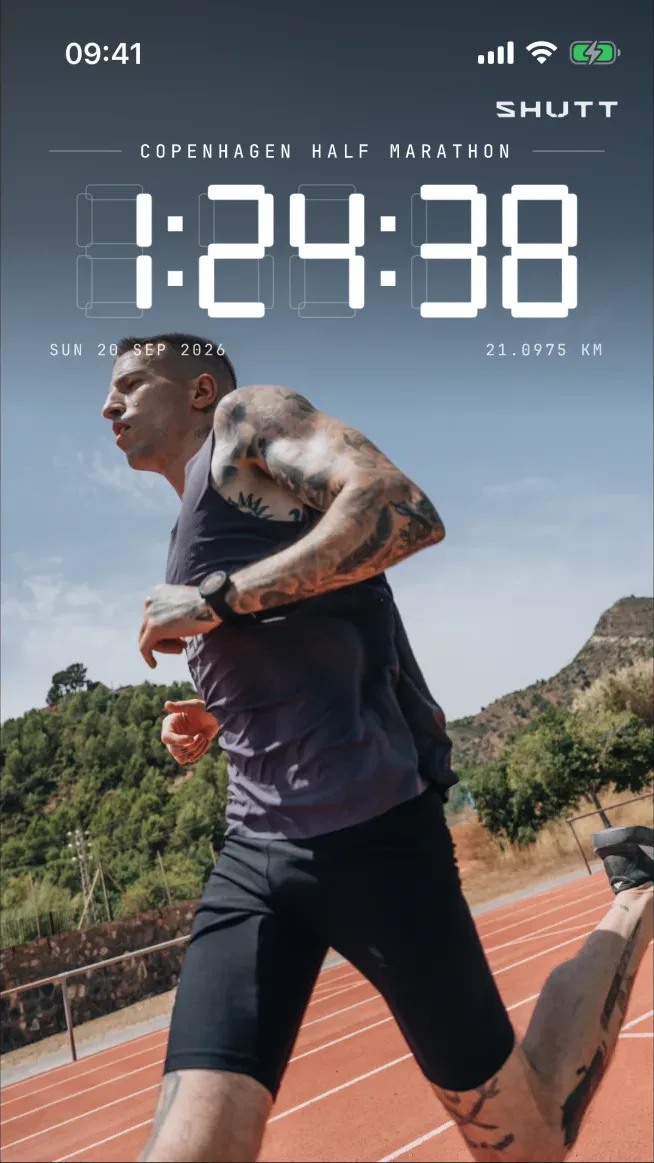
Distance, time, pace, splits and the route are free in SHUTT; free exports carry a small SHUTT mark, and heart-rate stats need Pro to save. Splits tables mark your fastest kilometre, which helps when the story is a negative split. StatShot, Picstat and Relay do similar jobs with different strengths; the overlay app comparison sets them side by side.
What should a PR graphic show?
Keep it to what proves the PR:
- The distance as a word, "5K" or "Half Marathon", rather than your watch's 5.03 km.
- The time, largest. For a race, use elapsed or chip time, not moving time, which leaves out stops.
- The old PR, if you want, in small type: "was 20:15". That is the number people react to.
- One extra at most: splits for an even or negative split, the route for a famous course.
The guide to race stats on a photo goes deeper on which time and which distance to print.
Is a Strava subscription worth it for PRs?
It depends on whether you want the history or the graphic. If you check your all-time top three often and want the trend over the years, the Best Efforts tab is part of the subscription, along with segment leaderboards, training analysis and Flyover. Strava lists it at €49.99 a year in the EU with a 30-day free trial (Strava, November 2026). If all you want is to post the PR once with a good photo, the free ways above cover it.